

Starting something new always comes with questions. As you set up your athlete Profile on Ontheside, our goal is to make the process clear, simple, and empowering. Below is a walkthrough of what goes into your Profile, why each piece matters, and how it all works together to showcase you as an athlete-creator.
Your First Look
When you first log into Ontheside, take some time to tour the platform and explore content created by other athlete-creators. When you’re ready to get started, select View Profile from the drop-down menu under the Profile icon  and then select Edit Profile.
Across the top of the profile editor, you’ll see five icons that guide you through building your Profile:
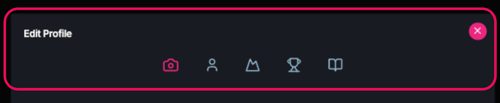
- Camera – your Profile photo, Gallery and other design options
- Person – information about you
- Mountain – your Sport(s)
- Trophy – your Achievements (Accomplishments, Awards and Stats)
- Book – your Story and Mantra
Each section helps create a complete picture of who you are and is key to sharing your perspective and what's most meaningful to you. They give fans and potential sponsors a clearer way to understand your journey and connect with your story.
Publishing Your Profile
Making your Profile public is simple. To get started, add a Profile Photo, a Display Name, and upload a couple of images or videos to your Gallery. You can add up to 10 images to create your Gallery, which appears at the top of your public Profile page. You can choose how these images are displayed by selecting a layout from the Gallery Layout Style drop-down menu at the bottom of the Edit Profile Camera Tab.
Next, go to the Person Icon. Here, you can add your Display Name and at the bottom of the tab you’ll find a Create Your Profile Card button. Click this button to make your Profile public. Once your Profile Card is created, your profile will appear in the main Discover feed and be searchable from the search bar at the top of both the Following and Discover feeds.
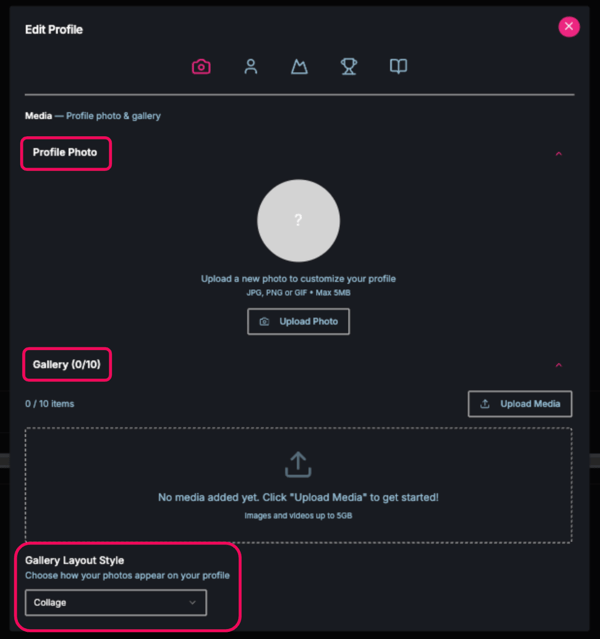
You can also take your time and complete additional Profile sections to build your presence on Ontheside. Don’t worry, even if you don’t choose to create a Profile Card right away, other users can still discover you through any content you post on Ontheside.
You’re always in control of your Profile. You can edit or update your details at any time. When you make any updates to your Profile select Repost Profile to reshare your Profile Card with the Ontheside community.
Your Profile also includes your permanent Username, Display Name, and Highlights. You can add additional Personal Information – such as your birthdate, educational background, height and weight, and primary location. This information gives viewers more context about you.
Finally, you can customize your Profile’s look by selecting a Background Style. Be sure to click Save after choosing the style and pattern that best fits you.
Tell More of Your Story
Publishing your profile is just the beginning. Once your Profile Card is created, you have additional opportunities to share more about you and what drives you. We encourage you to enhance your public Profile by adding detail to your Sports(s), Achievements, Story, and Mantra to bring more personality to your identity on the platform. As you make adjustments to your Profile, make sure to click “Save” as applicable. Your Sports and Achievements will automatically save as you add, remove, or reorder them.
To access these additional sections, go to “Edit Profile” in your Account menu and make your changes.
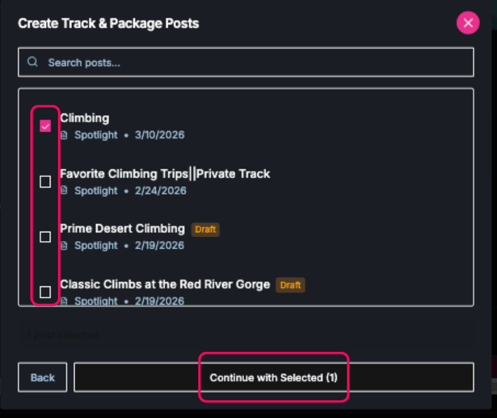
Filling in the additional Profile sections isn’t required. However, the more ways you give potential fans and sponsors to get to know you, the more reasons you give them to want to connect with and support you.
There's only one you!
Your Ontheside profile is designed to put your story and perspective front and center. Build a profile that reflects who you are and what matters most to you.
Your profile isn’t just your standard form information to fill out—it’s how fans and sponsors get to know you as the extraordinary athlete you are.
Tip: Looking for inspiration? Check out the profiles linked below for some well-developed profile examples:
What's Next?
Once your basic Profile information is complete, you're ready to start creating and sharing content on Ontheside. Your content is a dynamic way to grab attention,drive prospective fans to your Profile, and invite followers and sponsors to invest in your journey.
Ontheside currently supports six content types:
- Spotlight
 – images or short video clips
 - Episode
 – a single video or audio/video podcast
 - Guide
 – step-by-step content for sharing knowledge
 - SplitSync
 – a dual-video format for comparing perspectives
 - Event
 – a way to share and promote experiences
 - Article
 – long-form, magazine-style storytelling
All content can be shared directly to the feed or as part of a Track. When creating a Track you can choose from:
- Public (free) Track—available to anyone
- Private Track—with access granted by you
- Paid (exclusive) Track—requiring a paid access pass
This flexibility lets you decide how you engage your audience and earn. No matter the format, every piece of content helps develop your brand on Ontheside.
Hesitant about posting content?
You’re not alone. If you’re looking for inspiration, click the Ontheside logo in the top-left corner of the app to explore the Discover feed  .You’ll find other athletes, their profiles, and the content they’re sharing. The carousel on your Following feed page[insert icon] provides direct links to the Profiles of athletes you follow.
Have questions? Our Support team is here to help.
Want to dive deeper into content creation? Check out these awesome resources to keep building with confidence.
.jpg?width=900&name=Inside%20Track%20-%20Insights%20Hero%20Images%20-%20OTS%20(3).jpg)
.png?width=900&name=bringing%20fans%20to%20ontheside%20(1).png)