
We’re excited to have you Ontheside as an athlete-creator. Your Profile and first posts lay the foundation, taking you from a consumer to a creator that brands and audiences can follow and engage with. Here is a quick overview of some of the key opportunities to showcase who you are and how fans can connect with you.
Let's review each of these sections of the platform and take a look at how they are yours to shape.
Your Profile
Your Profile is where everyone can learn a little bit more about you, even without having an account. The Profile is broken down into three sections:
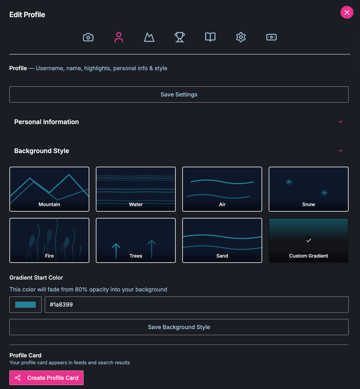
1. Your Gallery—which includes images and videos, your Achievements (i.e Accomplishments, Awards, and Stats), and your Story. You can decide on different layout options for your Gallery images when you edit your profile.
2. Your Profile Information—which features your profile image, your sport(s) and your Highlights message.
3. Your Content Feed—which includes all your content posts on the platform in order of publishing date. You can pin posts to the top of your feed, to always be listed first for viewers.


As you make changes to your Profile, make sure to click “Save” as applicable. Your Sports and Achievements will automatically save as you add or remove them.
Once you’re happy with your Profile, click “Create Profile Card” at the bottom of the Profile Settings tab  . This will publish your Profile to the Discover Feed and allows users to find you in their search results. Don’t worry, even if you don’t choose to create a Profile Card, users will still be able to find you through any content posted Ontheside.
Your Content
We can’t wait to see what you create! Hit the + Icon in the navigation bar to start a new content post. You can choose from multiple content type post options, depending on what you'd like to share.
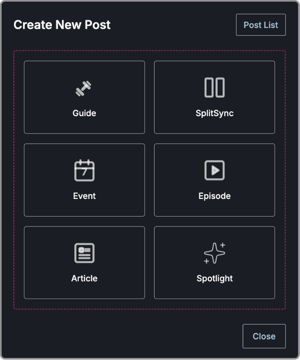
You may already be familiar with some content types.
Spotlight  continues to be your quick image and video content posting option. From daily or weekly updates, to behind-the-scenes from your latest workout. Now you can post a Spotlight in any format you'd like—portrait and landscape, video and image.
Episodes  —formerly known as Watch—can feature any longer-form video or podcast content you'd like to share with your audience. It can be captured in any perspective you'd like. Note that your file size should not exceed 5 GB.
Now let's take a look at some of the new content post types available to you.
Guide: Guides  allow you to separate your content into steps that the user will see one after another. This is a great opportunity for you to share a detailed breakdown of moves you include for specific workouts, or steps in a favorite recipe of yours. You can include both text and an image or video with each guide step (block).
→ Take a look at this Guide example here.
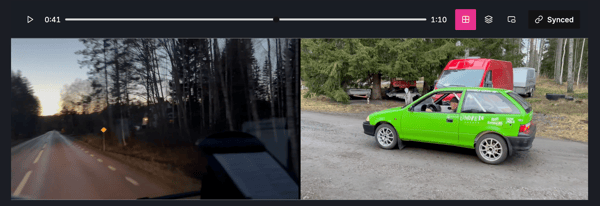
SplitSync: SplitSync  creates a dual view of two different videos or images in your feed. SplitSync allows you to share two different perspectives of the same content or different views for comparison. For example you could share your first person perspective in one video and a spectator's perspective in the other.
Event: You can now create events Ontheside. Events  can be an upcoming race or competition you're participating in, or an activity you'd like to raise awareness for. Once an event is created and published it will show up in the main feed, as well as the dedicated Events view.
Article: Articles  Ontheside are your long-form written content. There really is no limit to how long your article can be so let your creativity flow. You can include images and videos as part of articles too. Use the content editor in the tool to adjust your text, include hyperlinks, identify pullout quotes and more. Ontheside will automatically apply some fun formatting for you that you can Live Preview in the right column window of your Article Create New Post/Edit Post page on desktop. On your mobile phone click the eye icon to view a preview of your article.
→ Here's a great example of what your article could look like
And there you have it—the 6 content types on Ontheside at a glance. For more tips on how to get started with creating content, explore our Athlete-Creator-Resources.
The Discover and Following Feeds
When you first explore Ontheside, check out the Discover Feed  . Here you'll find all the latest and greatest content posted by any athlete on the platform. Once you've created your own account, you can choose to like, comment, message, or share the content. You can also choose to follow an athlete directly from their content posts. As you start to follow specific athletes you begin to populate your Following Feed
  . Fully personalized to you this feed pulls all posts from athletes you're connected to into one view.
Both in the Discover and Following Feed you'll be able to choose from a variety of filter and viewing options, among those:
- Different Layout views—Catch up on content in a single column view, or dual column perspective. By default, Ontheside is set to Masonry Locked, allowing you to view all content in two columns, and scroll the columns locked together.
- Events view—The dedicated filter for any events listed on Ontheside
- Sort—Choose to sort by most recent posts or most popular posts. Most popular posts are based on the number of likes the posts have received.
- Type filter—Select one or multiple content types, or choose to sort by published Profile Cards, to tailor your discovery experience.
Note: We highly encourage you to create your Profile Card in the Profile editor (see above) so users will be able to find you when filtering for just profiles.
Have fun exploring the new athlete-creator opportunities Ontheside. We can't wait to see how you'll make this world your own.
.png?width=900&name=frequently-asked-questions-hero%20(3).png)
.png?width=900&name=When%20NIL%20Isn%E2%80%99t%20an%20Option%20Where%20Athletes%20Can%20Still%20Win%20(1).png)