Tips for Discovering Athlete Content and New Sports on Ontheside

Start your journey Ontheside with these tips to find and connect with athletes who inspire you. Find what you're looking for based on your personal preferences and the content, athletes, or sports you search for. From the Discover Feed to your Home/Following Feed, you have many opportunities to explore new content.
Get Inspired With the Discover Feed
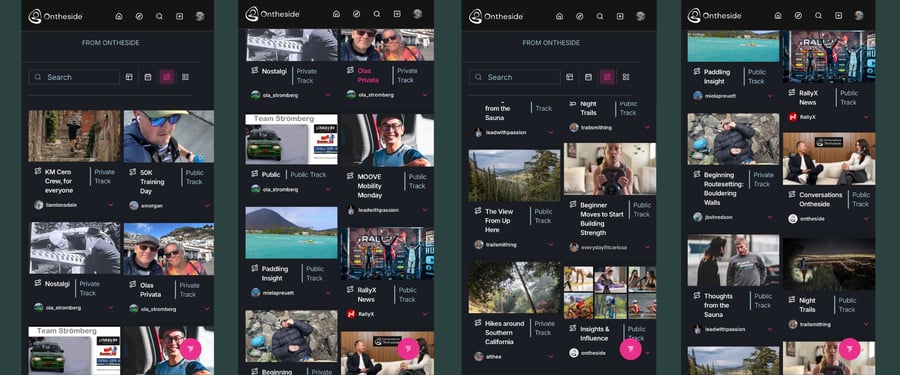
The Discover feed is your built-in search destination for content, athletes, and sports on Ontheside. Here you can search and wander without restrictions. Or, you can search with intent by using any combination of available filters. So let’s take a look at those filter options.
1. Filter using Search
The search bar is your most detailed way to search. Not only can you search by different words and phrases, but by specific sports and athletes (name or handle), too. Start typing and see what content and athletes await!
If you only want to see content posted by an athlete you’d like to follow, then the search bar is your best bet for the most direct results. Once you’ve found the athlete make sure to follow them. This will automatically add the athlete and all their past and future content to your Home Feed.
2. Filter by Content Type
The Type filter allows you to customize your Discover Feed by the type of content you want to explore. You can select one or multiple types to personalize your feed. The content type filter options are: Spotlight, Article, Episode, Event, Guide, SplitSync and Profile.
If you enjoy watching videos about snowboarding for example, you can search for snowboarding in the search bar and select Episode as your content type. That will narrow your search results to any long-form video posted by an athlete who has tagged their account with snowboarding as their sport, or included the keyword snowboarding in their post title or description.
Tip: Look for the pink circle with the “tornado” icon in the bottom right corner. That’s the floating filter. It lets you quickly and easily switch between content types. Your feed will automatically adjust based on your selection. Here's a quick video of how it works.
3. Filter for Track Content
When you select the Tracks filter your content feed automatically adjusts to showcase all Public (free), Private, or Paid Tracks that athletes have created on Ontheside. These Tracks function like playlists for content focused on different topics, initiatives or goals.
Content shared within a Track can fall into any of the following categories - as indicated in the feed.
- Public: Content shared in Public Tracks, appears in the main feed and can be discovered by anyone.
- Private: Content assigned to Private Tracks is shared only with individuals or groups approved by the athlete-creator.
- Paid: Content assigned to Paid Tracks is available only when purchased with an all-access pass.
4. Use a combination of filters
As noted in the example for content type filters, you can choose to apply multiple filters to narrow your search. However, we recommend not to narrow your search too much so you don't limit the fun in discovering new sports, athletes, and content.
Wander and connect with your next favorite sports and athletes
Now that you know more about how to find sports and athletes on Ontheside, go explore and enjoy! Find more content you love and athletes to follow and learn from.